
How to Use the Upload Options Feature
To optimize uploads in the system without configuring too many steps, follow the guide below to set up Upload Options easily:
Step 1: Open the Upload Options interface
- First, open the software interface and select Upload Options from the main menu.
- You will see a dashboard with the available groups and options.
Step 2: Create a new option group
- In the Upload Options interface, click Add Group to create a new group.
- Enter the option group name, such as Advanced Upload, then click Save.
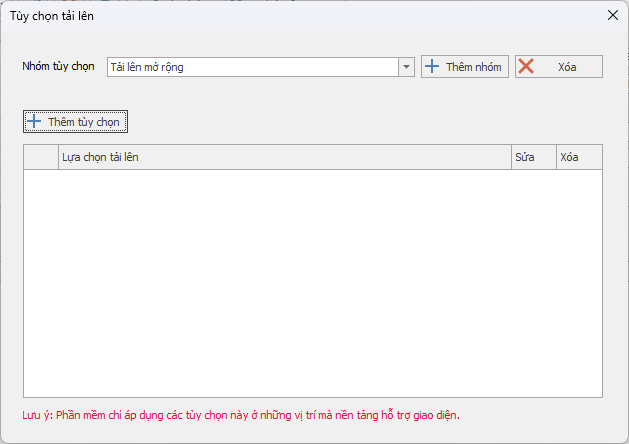
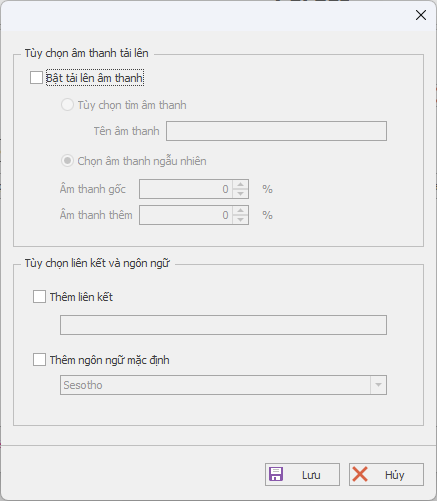
Step 3: Add options to the group
- After creating the group, you can add options to it by clicking Add Option.
- A new window will appear, where you can choose the necessary features such as Audio, Link, Default Language.
- Customize the settings for each option:
Make sure all options have been set up correctly. - Audio: Select original audio or random audio, and adjust the ratio between original audio and added audio.Link: Choose to add a link if needed and fill in the required information.Language: Select the default language for uploads, such as English.
Step 4: Review and save
- After you finish adding the options, review all selections to make sure they have been configured correctly.
- If everything is ready, click Save to save the group and its options.
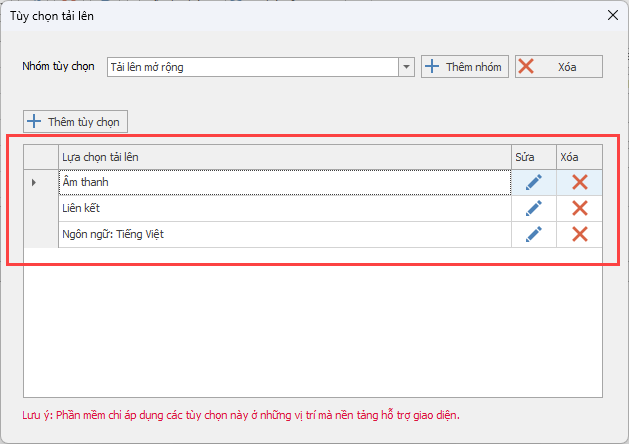
Note: The software only applies these options in areas where the platform supports the interface.
With the steps above, you can easily configure upload options to match your needs. Make sure all settings are carefully reviewed before saving to avoid errors during use.
If you have any questions, please contact us via our website and fanpage
https://dhbtools.com/
http://m.me/dhbtools
https://www.facebook.com/dhbtools
Bình luận
Chưa có bình luận nào. Hãy là người đầu tiên!

Hướng dẫn chi tiết tính năng DHB Monitor trong phần mềm DHB Upload Facebook
Tính năng DHB Monitor giúp người dùng theo dõi kênh, trang mạng xã hội (TikTok, Facebook, YouTube…) và tự động đồng bộ và đăng nội dung. Đây là công cụ quan trọng để tiết kiệm thời gian,
Read more →
Cách đổi tài khoản Facebook sang tài khoản chuyên nghiệp và đặt lịch đăng Reels bằng DHB Upload Facebook
Nếu bạn đang xây dựng thương hiệu cá nhân, bán hàng online hoặc làm nội dung Reels, việc chuyển sang tài khoản Facebook chuyên nghiệp (Professional Mode) là bước quan trọng. Sau khi chuyển đổi, bạn c
Read more →
Hướng dẫn đăng Status kèm Link sản phẩm trên DHB Upload Facebook
Tính năng đăng Status kèm Link sản phẩm đặc biệt phù hợp với mô hình Affiliate Marketing (AFF), giúp bạn điều hướng traffic trực tiếp về link tiếp thị, gia tăng tỷ lệ click (CTR) và tối ưu doanh thu
Read more →
Hướng dẫn thêm "Cộng tác viên" khi tải lên Video
Để có thể thêm CTV thì giao diện tải lên của Page các bạn phải nhập được Tag! Trước tiên cần thêm đường dẫn Page CTV vào mục Tag của video cần tải lên.Lưu ý: Mỗi video chỉ có thể thêm 1 Page CTV n
Read more →