
How to Post a Status with a Product Link on DHB Upload Facebook
The posting feature Status with Product Link is especially well suited for the Affiliate Marketing AFF model, helping you direct traffic straight to affiliate links, increase click-through rate CTR, and optimize commission revenue. Instead of posting manually, the system lets you configure AFF links accurately, consistently, and automate the publishing workflow, ensuring every post is attached to the right product link, the right Page, and the right content strategy.
Currently, the system only supports uploading Status using the correct workflow in the Facebook Business Suite interface.
The upload feature for Reels is not supported yet. Please select the correct content type and follow the guide to ensure the upload process runs accurately and reliably.
Step 1: Select Type → Status → Enter the status content
Steps:
- In the main interface
- Select Type → Status
- Click Enter Caption
- You can import prepared captions in bulk from Excel, or draft them directly.
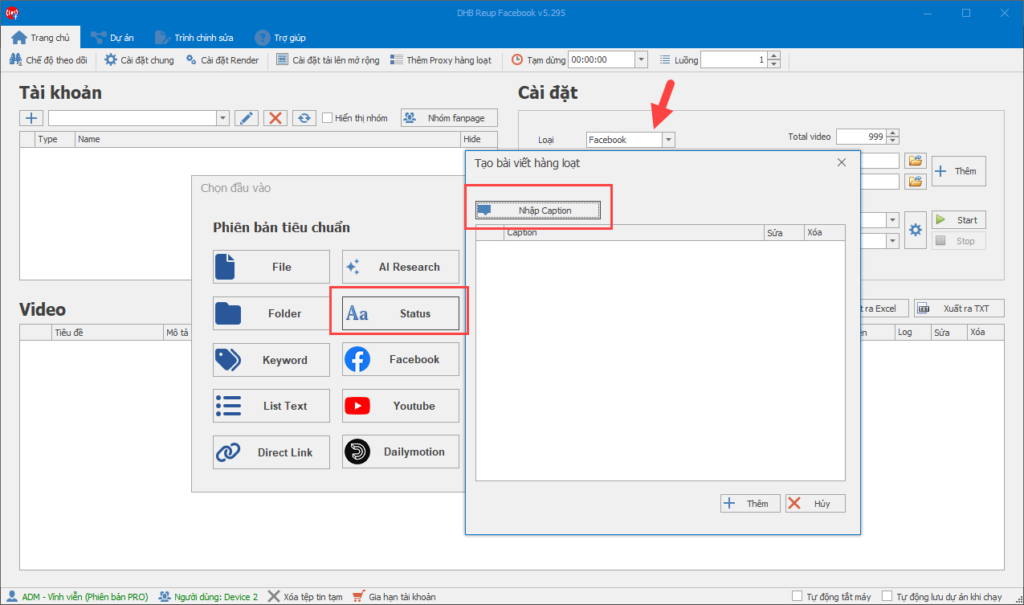
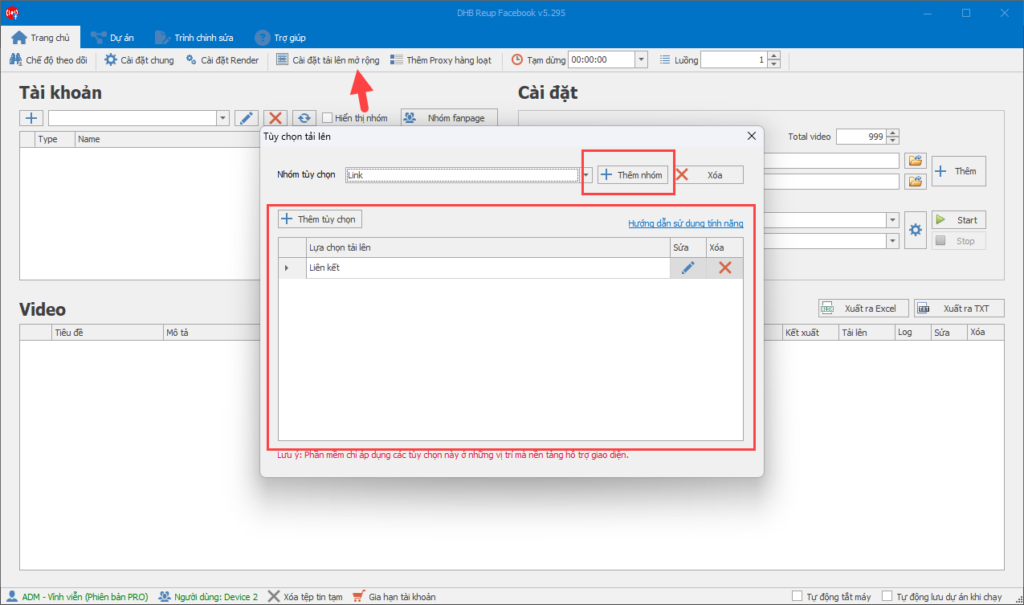
Step 2: Advanced upload options → Create group → Attach product link
Steps:
- Go to Advanced upload settings
- Click Create group
- Select Enter Link
- Paste the product link you want to promote
- Save the option
See more instructions about the advanced upload settings feature here.
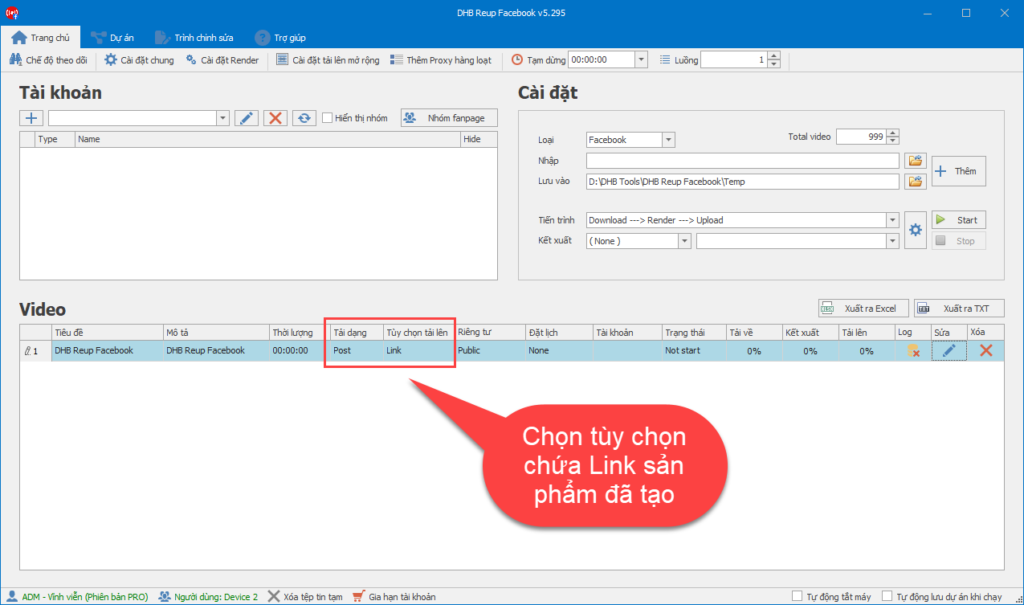
Step 3: Select Page → Select the upload option with link
After creating the Link:
- Select the Page you want to post to
- In the Upload options
- section, select the correct group you just created that contains the product link
Step 4: Run and wait for completion
- Click Start
- The system will automatically:
- Post the Status
- Attach the product link
- Publish the post to the selected Page
- Wait until completed
For any questions, please contact us via our website and fanpage
https://dhbtools.com/
http://m.me/dhbtools
https://www.facebook.com/dhbtools
Bình luận
Chưa có bình luận nào. Hãy là người đầu tiên!

Hướng dẫn sử dụng tính năng Tùy chọn tải lên
Để tối ưu hóa việc tải lên trong hệ thống mà không cần cài đặt quá nhiều bước, bạn có thể làm theo các bước dưới đây để cấu hình Tùy chọn tải lên một cách dễ dà
Read more →
Hướng dẫn chi tiết tính năng DHB Monitor trong phần mềm DHB Upload Facebook
Tính năng DHB Monitor giúp người dùng theo dõi kênh, trang mạng xã hội (TikTok, Facebook, YouTube…) và tự động đồng bộ và đăng nội dung. Đây là công cụ quan trọng để tiết kiệm thời gian,
Read more →
Cách đổi tài khoản Facebook sang tài khoản chuyên nghiệp và đặt lịch đăng Reels bằng DHB Upload Facebook
Nếu bạn đang xây dựng thương hiệu cá nhân, bán hàng online hoặc làm nội dung Reels, việc chuyển sang tài khoản Facebook chuyên nghiệp (Professional Mode) là bước quan trọng. Sau khi chuyển đổi, bạn c
Read more →
Hướng dẫn thêm "Cộng tác viên" khi tải lên Video
Để có thể thêm CTV thì giao diện tải lên của Page các bạn phải nhập được Tag! Trước tiên cần thêm đường dẫn Page CTV vào mục Tag của video cần tải lên.Lưu ý: Mỗi video chỉ có thể thêm 1 Page CTV n
Read more →