
How to Switch a Facebook Account to Professional Mode and Schedule Reels with DHB Upload Facebook
If you are building a personal brand, selling online, or creating Reels content, switching to a Facebook Professional Mode account is an important step. After switching, you can use DHB Upload Facebook to automatically schedule public Reels posts to your Profile.
Guide to switching Facebook to a professional account
Step 1: Go to your personal profile
- Open Facebook
- Go to your Personal Profile
- Click the 3-dot icon … next to the Edit Profile button
Step 2: Turn on professional mode
- Select Turn on professional mode
- Click Continue
- Confirm to turn it on
After switching to professional mode: How to schedule Reels posts with DHB Upload Facebook
If you are using the DHB Upload Facebook software, here is how to set it up to post Reels to your Profile and schedule them publicly.
Step 1: Select the correct Profile account
In the software interface:
- Go to Accounts
- Select the Profile that has professional mode enabled
Step 2: Add videos to the list and configure upload settings
- Add videos to the video table
- Schedule the video
- In the upload type column, select Reels
- Select the upload account
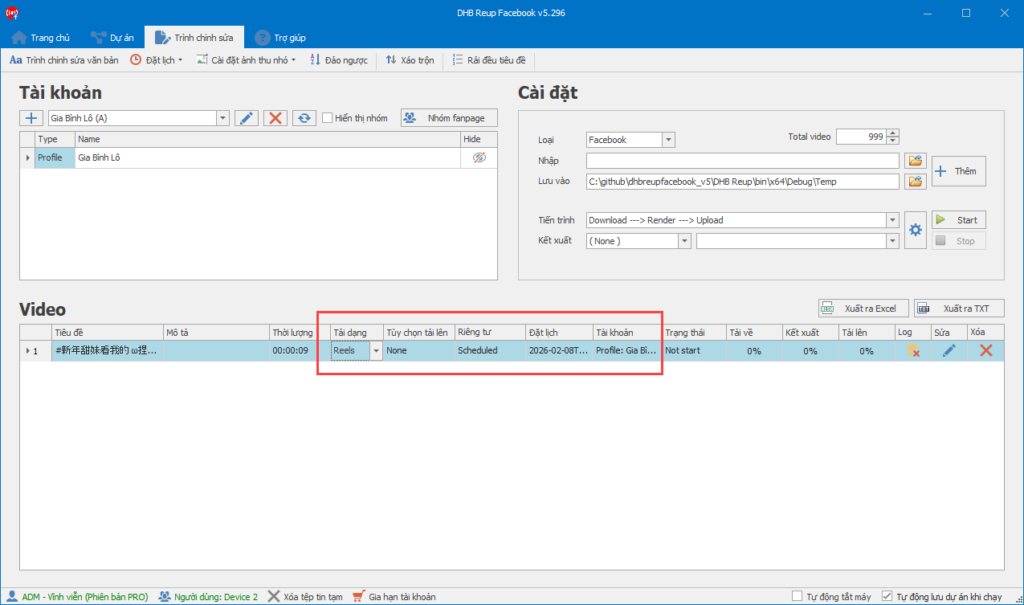
After completing these steps, you can click Start and wait for the video upload to finish.
If you have any questions, please contact us via our website and fanpage
https://dhbtools.com/
http://m.me/dhbtools
https://www.facebook.com/dhbtools
Bình luận
Chưa có bình luận nào. Hãy là người đầu tiên!

Hướng dẫn sử dụng tính năng Tùy chọn tải lên
Để tối ưu hóa việc tải lên trong hệ thống mà không cần cài đặt quá nhiều bước, bạn có thể làm theo các bước dưới đây để cấu hình Tùy chọn tải lên một cách dễ dà
Read more →
Hướng dẫn chi tiết tính năng DHB Monitor trong phần mềm DHB Upload Facebook
Tính năng DHB Monitor giúp người dùng theo dõi kênh, trang mạng xã hội (TikTok, Facebook, YouTube…) và tự động đồng bộ và đăng nội dung. Đây là công cụ quan trọng để tiết kiệm thời gian,
Read more →
Hướng dẫn đăng Status kèm Link sản phẩm trên DHB Upload Facebook
Tính năng đăng Status kèm Link sản phẩm đặc biệt phù hợp với mô hình Affiliate Marketing (AFF), giúp bạn điều hướng traffic trực tiếp về link tiếp thị, gia tăng tỷ lệ click (CTR) và tối ưu doanh thu
Read more →
Hướng dẫn thêm "Cộng tác viên" khi tải lên Video
Để có thể thêm CTV thì giao diện tải lên của Page các bạn phải nhập được Tag! Trước tiên cần thêm đường dẫn Page CTV vào mục Tag của video cần tải lên.Lưu ý: Mỗi video chỉ có thể thêm 1 Page CTV n
Read more →