
Detailed Guide to the DHB Monitor Feature in DHB Upload Facebook
The DHB Monitor feature helps users track channels and social media pages (TikTok, Facebook, YouTube, etc.) and automatically Download and repost videos or posts. This is an essential tool for saving time, syncing content, and managing Upload workflows efficiently.
1. Main interface of DHB Monitor
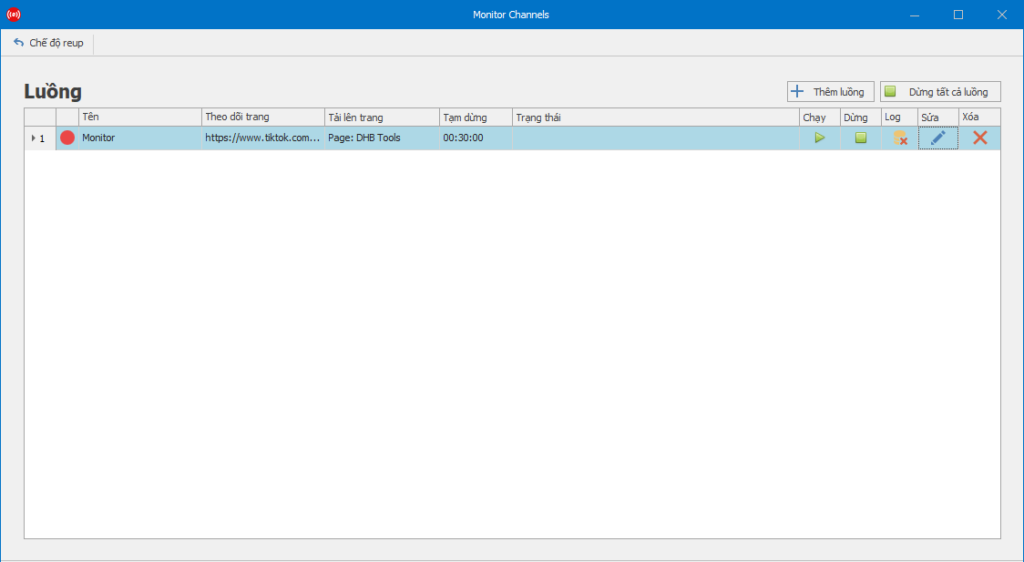
In the Monitor Channels tab, users will see the list of streams currently being monitored.
Main information columns:
- Name: the name of the monitoring stream (you should name each stream by topic or channel name for easier identification).
- Follow page: displays the TikTok, Facebook, or YouTube link being monitored.
- Upload to page: the channel or profile that will repost the content.
- Pause: the rest interval between scans.
- Status: the current operating status.
- Action: includes the Run ▶, Stop ⏹, Log 📜, Edit ✎, and Delete ❌ buttons.
📌 Users can click Add stream to create a new stream or Stop all streams when they need to pause everything.
2. Set up a monitoring stream in detail
When you click Edit or Add stream, the configuration window will appear with the following sections:
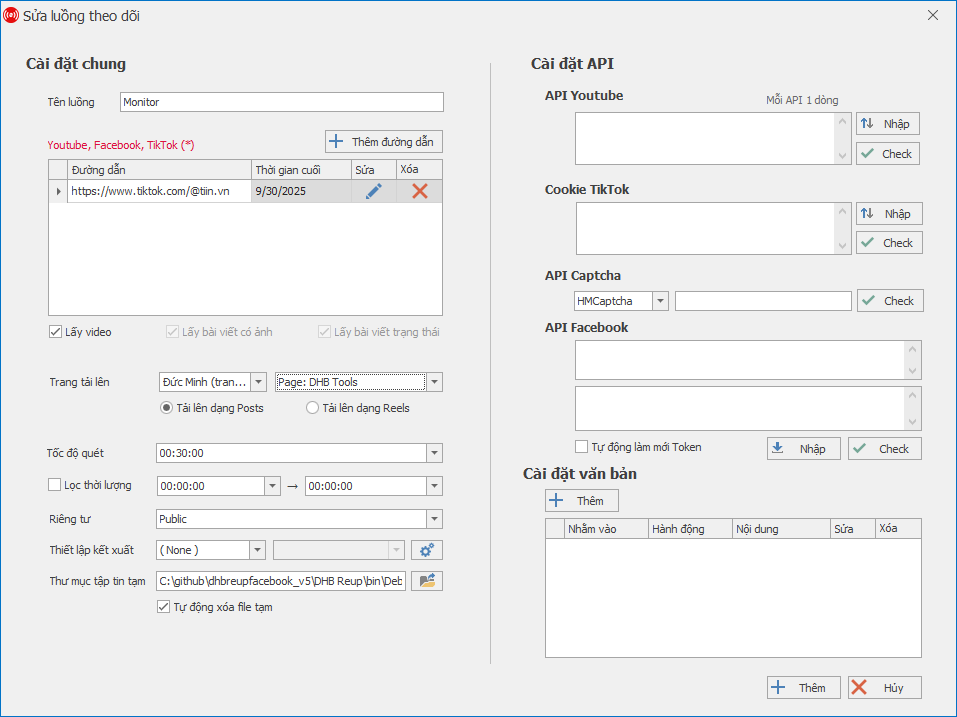
2.1. General settings
- Stream name: set an easy-to-remember name, for example: Monitor TikTok Tin.vn.
- URL: enter the page/channel link you want to monitor (TikTok, Facebook, YouTube).
- Last time: the software will only fetch new content from this point onward.
- Content type to fetch: select Fetch videos, Fetch posts with images, Fetch status posts.
- Upload page: choose the profile/channel where you want to repost.
- Scan speed: the interval for rescanning (for example: once every 30 minutes).
- Duration filter: only fetch videos within the desired duration range (for example >30s).
- Privacy: set the mode to Public, Private or Unlisted.
- Render settings: optional settings for the exported file/video format.
- Temporary folder: where temporary files are stored before upload; you can enable Auto-delete temporary files to save storage space.
2.2. API settings
- API YouTube: enter the API key for upload connection.
- Cookie TikTok: used to fetch video data accurately and avoid being blocked.
- API Captcha: supports automatic captcha solving (HMCaptcha, 2Captcha, etc.).
- API Facebook: enter the token to upload videos to Facebook.
- The Auto-refresh Token option helps the software maintain login status.
2.3. Text settings
Allows automatic editing of titles, descriptions, and tags before reposting.
Example:
- Action: Append to end
- Content: #shorts #viral
➡️ This helps optimize SEO and avoid duplicating the original content.
3. Operating workflow
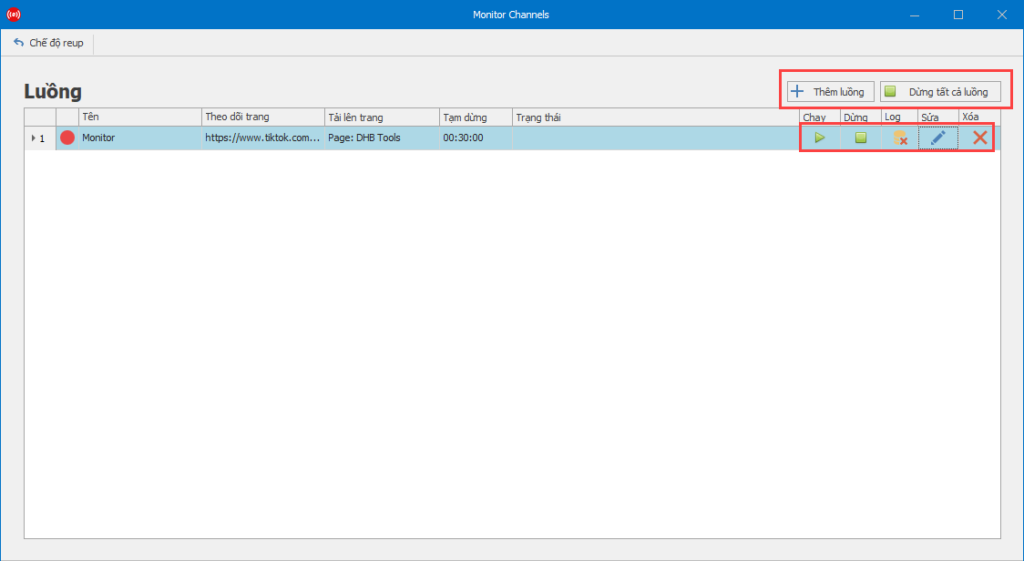
- Add a monitoring stream → enter the TikTok/Facebook/YouTube link.
- Choose the upload destination (profile/channel).
- Configure scan speed, video filters, and API connections.
- Click Run ▶ to start.
- New content will be automatically downloaded → saved as a temporary file → title/description edited → posted to your channel.
For any questions, please contact us via our website and fanpage
https://dhbtools.com/
http://m.me/dhbtools
https://www.facebook.com/dhbtools
Bình luận
Chưa có bình luận nào. Hãy là người đầu tiên!

Hướng dẫn sử dụng tính năng Tùy chọn tải lên
Để tối ưu hóa việc tải lên trong hệ thống mà không cần cài đặt quá nhiều bước, bạn có thể làm theo các bước dưới đây để cấu hình Tùy chọn tải lên một cách dễ dà
Read more →
Cách đổi tài khoản Facebook sang tài khoản chuyên nghiệp và đặt lịch đăng Reels bằng DHB Upload Facebook
Nếu bạn đang xây dựng thương hiệu cá nhân, bán hàng online hoặc làm nội dung Reels, việc chuyển sang tài khoản Facebook chuyên nghiệp (Professional Mode) là bước quan trọng. Sau khi chuyển đổi, bạn c
Read more →
Hướng dẫn đăng Status kèm Link sản phẩm trên DHB Upload Facebook
Tính năng đăng Status kèm Link sản phẩm đặc biệt phù hợp với mô hình Affiliate Marketing (AFF), giúp bạn điều hướng traffic trực tiếp về link tiếp thị, gia tăng tỷ lệ click (CTR) và tối ưu doanh thu
Read more →
Hướng dẫn thêm "Cộng tác viên" khi tải lên Video
Để có thể thêm CTV thì giao diện tải lên của Page các bạn phải nhập được Tag! Trước tiên cần thêm đường dẫn Page CTV vào mục Tag của video cần tải lên.Lưu ý: Mỗi video chỉ có thể thêm 1 Page CTV n
Read more →