
How to Add a Captcha API to DHB Upload TikTok
DHB software currently supports HMCaptcha,AchiCaptcha and will support more third-party Captcha API services in the future, giving you more flexible and diverse options.
Note: Captcha sources may be changed or added depending on the performance and stability of the Captcha service provider, so please only top up enough balance for your needs.
DHB Tools is not responsible for cases where the website stops operating or withdrawals cannot be made, and users must comply with the terms of service of the Captcha API provider.
Step 1: Create an account and top up
First, create an account and top up your balance.
HMCaptcha: Register an account or if you already have an account, log in here.
AchiCaptcha: Register or log in here.
Note: When creating an account, please enter only a username with no special characters or symbols such as >.<?/...; use only Latin alphabet characters. This helps avoid bank transfer content limits that may prevent your order from being completed automatically.
After logging in successfully, top up your account balance. Please only add enough funds for current use so you can evaluate performance and stability first.
Step 2: Get the API Key
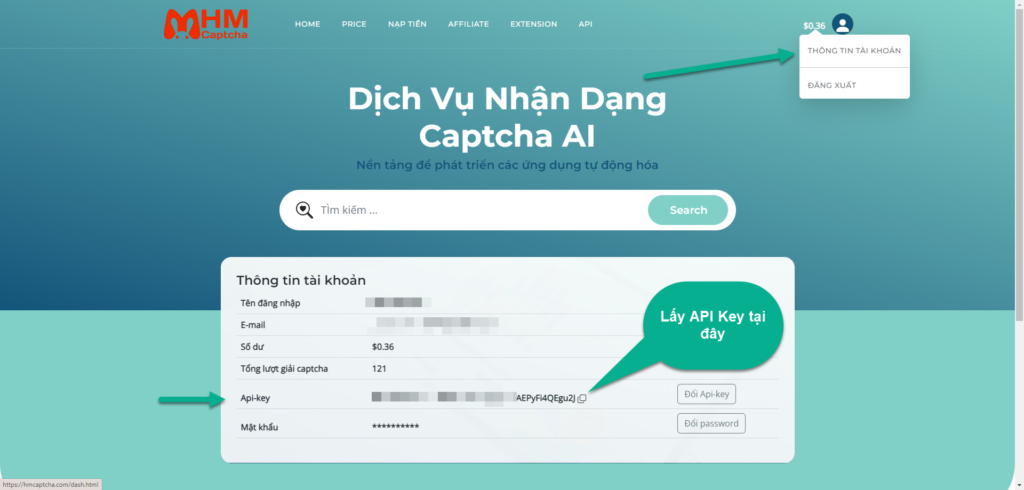
After successfully topping up, go to the account information section
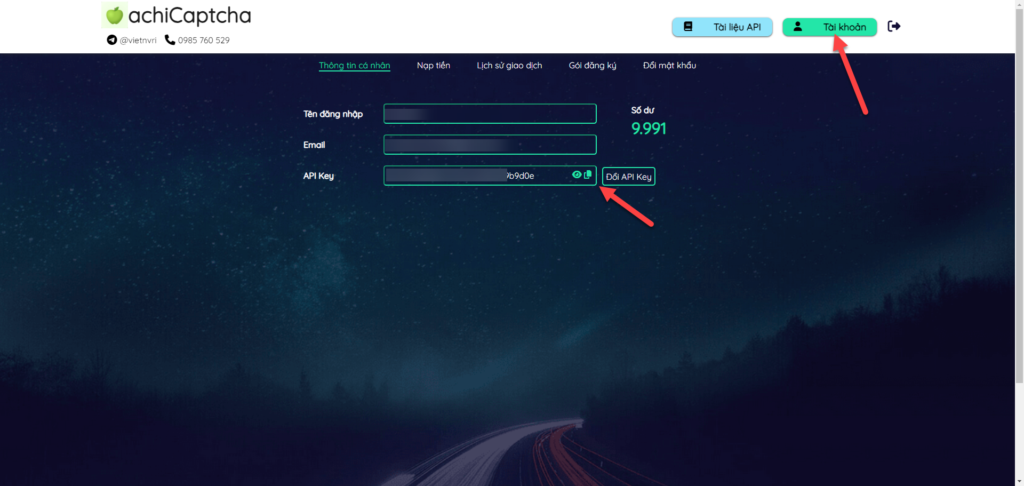
AchiCaptcha is similar: Account -> Get API Key
Step 3: Paste the API Key into DHB Upload TikTok
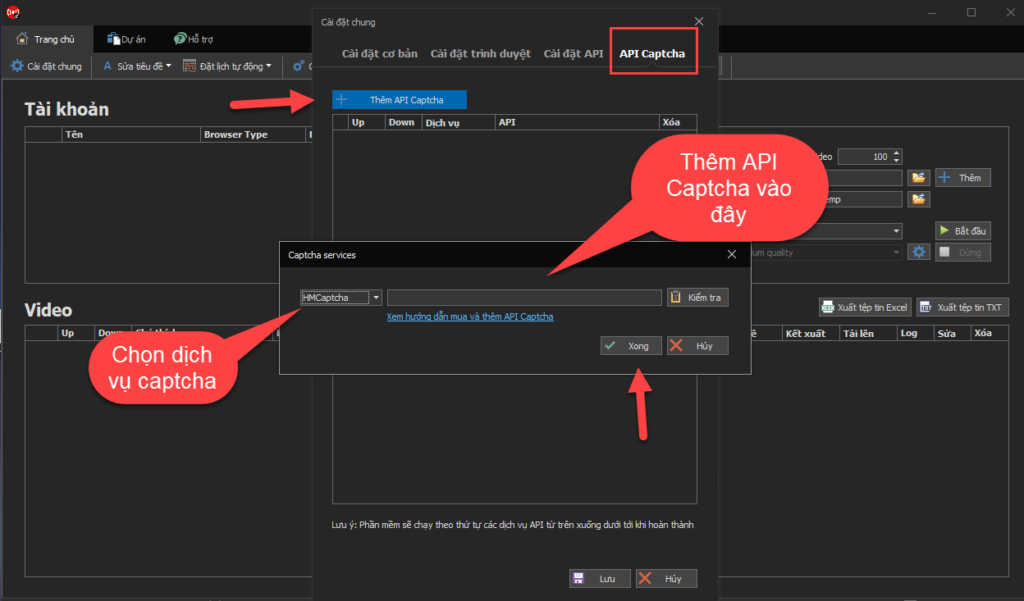
After obtaining the API Key, paste it into the API Captcha section in the general settings of DHB Upload TikTok
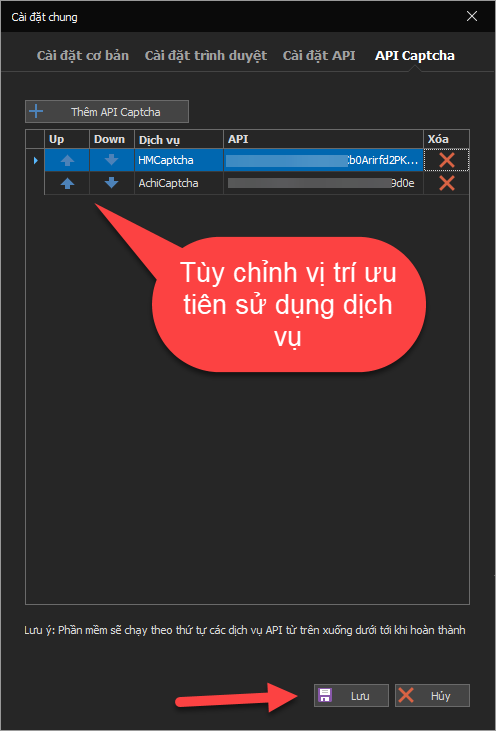
After adding it, click Save and run the upload. At this point, the software can solve captchas automatically through a third-party service.
If you have any questions, please contact us via our website & fanpage
https://dhbtools.com/
http://m.me/dhbtools
https://www.facebook.com/dhbtools
Bình luận
Chưa có bình luận nào. Hãy là người đầu tiên!

Hướng Dẫn Chi Tiết Chức Năng Theo Dõi Kênh – Phần Mềm DHB Upload TikTok
Chức năng Theo dõi kênh cho phép bạn thêm các luồng theo dõi (monitor channels), tự động quét nội dung mới từ các nền tảng (YouTube, TikTok, Facebook) và đăng theo cấu hình bạn đặt sẵn.
Read more →
Hướng dẫn lấy Cookie TikTok
Vui lòng không bỏ qua các bước, chữ và ảnh nội dung bài viết hướng dẫn! Bước 1: Mở trình duyệt đã đăng nhập sẵn tài khoản TikTok. Nếu chưa có hãy tạo tài khoản Tại trang chủ nhấn chuột phải và chọn Inspect hoặc F12 để vào Dev Tools
Read more →
Hướng dẫn gắn giỏ hàng khi tải lên video với DHB Upload TikTok
Hiện tại TikTok đã hỗ trợ gắn giỏ hàng cho sản phẩm được tải lên qua website. Bài viết này sẽ hướng dẫn các bạn các bước setup để gắn giỏ hàng cho video. Lưu ý: Hiện tại, nếu đăng video có gắn sản
Read more →
Hướng dẫn thêm kênh TikTok sử dụng phần mềm DHB Upload TikTok
Hiện tại các bạn đã có thể chọn sử dụng nhiều trình duyệt khác nhau khi sử dụng phần mềm DHB Upload TikTok mà không cần đổi qua lại giữa các tick. Dưới đây sẽ là các bước hướng dẫn thêm tài khoản.
Read more →