
Detailed Guide to the Channel Monitoring Feature – DHB Upload TikTok Software
The Channel Monitoring feature lets you add monitoring streams, automatically scan for new content from platforms such as YouTube, TikTok, and Facebook, then publishing it based on your preset configuration.
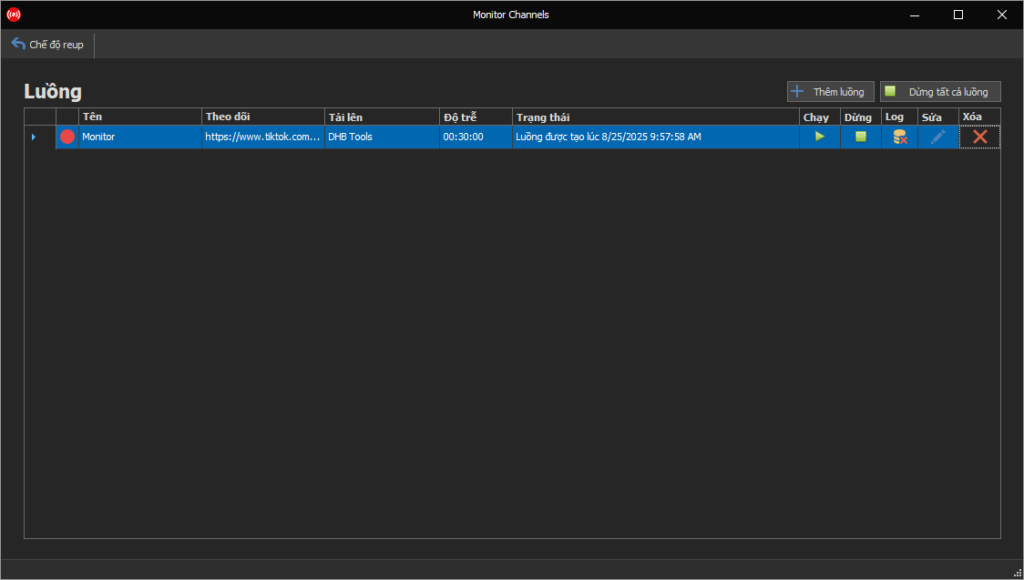
1. Main interface
In the main interface, you will see the list of streams you have created. Each stream represents a channel or a link that you want to monitor.
Main components:
- Add Stream: Button to create a new monitoring stream.
- Run Stream (Play): Start monitoring and processing the selected stream.
- Stop Stream (Stop): Stop the monitoring process.
- Log: View detailed activity logs for the stream.
- Edit: Edit the stream configuration.
- Delete: Remove the stream from the list.
- Stop All Streams: Stop all active streams.
Each stream displays the following information:
- Name
- Monitoring link (YouTube, TikTok, Facebook link)
- Upload account
- Delay (The time between each scan for new content)
- Status (running or stopped).
2. Add and configure a stream
When you click Add Stream, the detailed configuration interface will open.
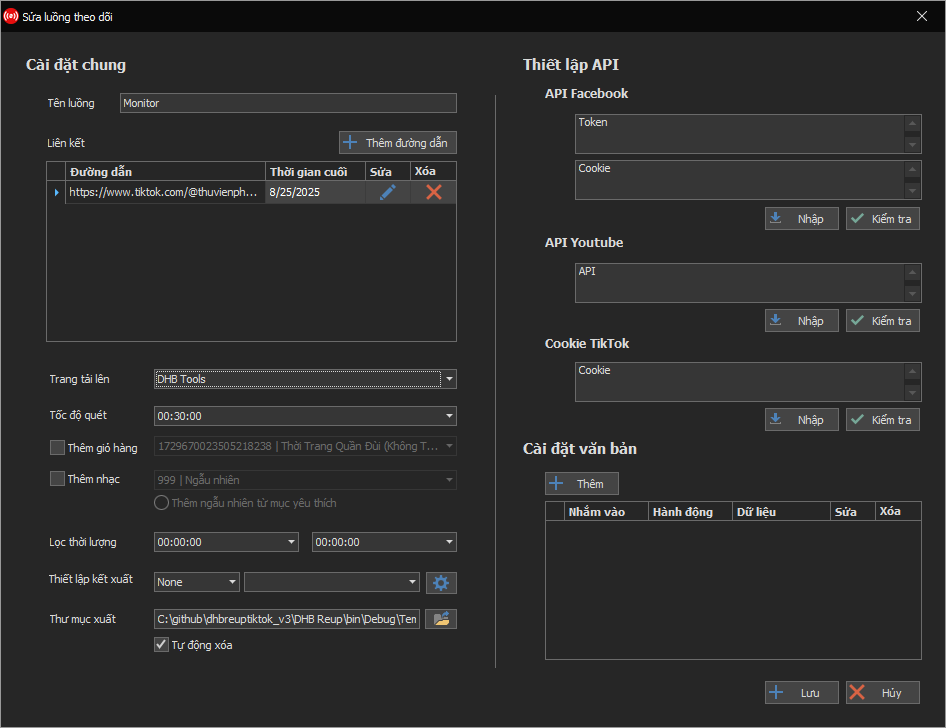
General Settings
- Stream name: Set an easy-to-remember name for management.
- Link: Where you add the channel/video links to monitor (at least one link is required).
- Upload page: Select the destination account or group where the video will be published.
- Scan speed: The time between each scan for new content.
- Add shopping cart / Add music:
- These two sections only appear when the account already has shopping cart or music data.
- If there is no data, the option will be hidden.
- Duration filter: Only monitor videos with durations within the specified range.
- Render settings: Choose the output format/processing for the video.
- Output folder: Temporary storage path for downloaded files. You can enable Auto delete to save storage space.
API Settings
- Facebook API: Enter the Token and Cookie for authentication.
- YouTube API: Enter the API Key to connect to YouTube.
- TikTok Cookie: Enter the cookie to monitor a TikTok channel.
- The Import and Check buttons help you verify that the API/Cookie is still active.
Text Settings
- You can add text rules such as:
- Target (where the rule applies).
- Action (for example: rewrite with AI, translate text, replace, delete).
- Data (the text content to be processed).
3. Quick workflow
- Go to the main interface → Click Add Stream.
- Enter the Stream name and Link to monitor.
- Select the Upload page and set the scan speed.
- Configure additional APIs (Facebook, YouTube, TikTok) if needed.
- (Optional) Add a shopping cart or music if the account already has data.
- Save → The stream will appear in the main interface.
- Click Run so the system starts monitoring and processing.
With this, the Channel Monitoring feature lets you automate content monitoring and processing across multiple platforms, saving time and managing channels centrally in one interface.
For any questions, please contact us via our website and fanpage
https://dhbtools.com/
http://m.me/dhbtools
https://www.facebook.com/dhbtools
Bình luận
Chưa có bình luận nào. Hãy là người đầu tiên!

Hướng dẫn lấy Cookie TikTok
Vui lòng không bỏ qua các bước, chữ và ảnh nội dung bài viết hướng dẫn! Bước 1: Mở trình duyệt đã đăng nhập sẵn tài khoản TikTok. Nếu chưa có hãy tạo tài khoản Tại trang chủ nhấn chuột phải và chọn Inspect hoặc F12 để vào Dev Tools
Read more →
Hướng dẫn thêm API Captcha vào DHB Upload TikTok
Hiện tại phần mềm đã hỗ trợ HMCaptcha,AchiCaptcha và tương lai sẽ hỗ trợ thêm nhiều dịch vụ API Captcha từ bên thứ 3 khác để các bạn có thể tùy chỉnh và đa dạng hơn. Lưu
Read more →
Hướng dẫn gắn giỏ hàng khi tải lên video với DHB Upload TikTok
Hiện tại TikTok đã hỗ trợ gắn giỏ hàng cho sản phẩm được tải lên qua website. Bài viết này sẽ hướng dẫn các bạn các bước setup để gắn giỏ hàng cho video. Lưu ý: Hiện tại, nếu đăng video có gắn sản
Read more →
Hướng dẫn thêm kênh TikTok sử dụng phần mềm DHB Upload TikTok
Hiện tại các bạn đã có thể chọn sử dụng nhiều trình duyệt khác nhau khi sử dụng phần mềm DHB Upload TikTok mà không cần đổi qua lại giữa các tick. Dưới đây sẽ là các bước hướng dẫn thêm tài khoản.
Read more →