
Today, Shopee is growing rapidly as an e-commerce platform, with livestream engagement reaching up to 50 million interactions. In this article, I will show you how to stream a pre-recorded video from your computer to Shopee to promote products or support your sales needs.
Step 1: Create a livestream on Shopee Live
Here you will start setting up your livestream. If you are not logged in yet, please log in first.
After logging in, set up your live title and cover image, then add the products you want to promote.

Step 2: Get the stream key on Shopee
After you have completed all the necessary information to optimize your livestream, click Next to go to the page where you can get the stream key.

Step 3: Add the stream in DHB Stream Pro
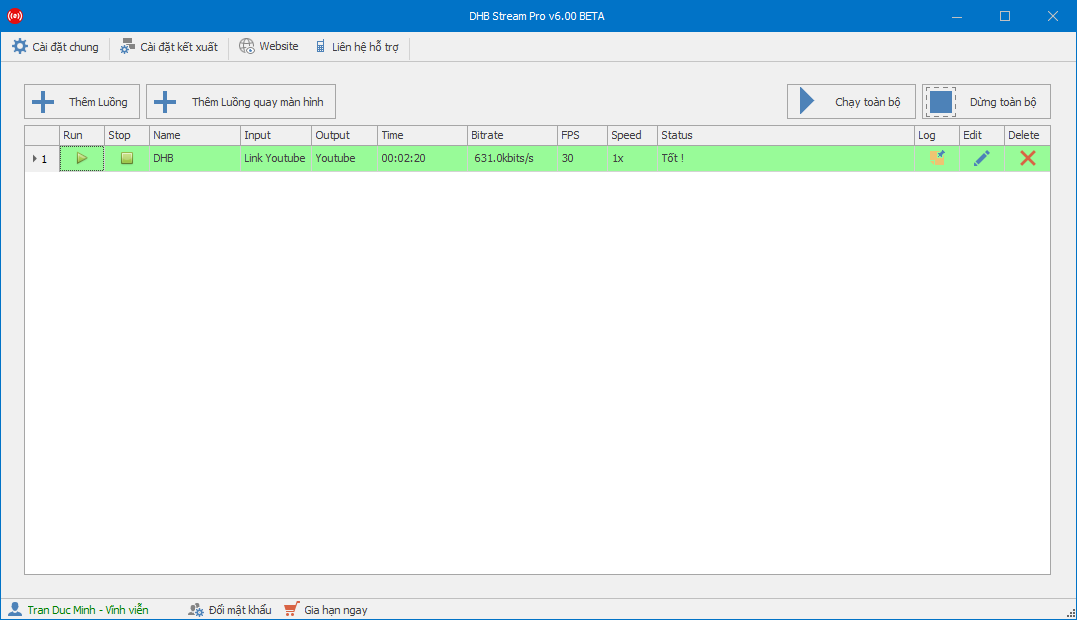
Open DHB Stream Pro and set it up as shown in the image.

Step 4: Run the stream and Go Live on Shopee
After adding the stream successfully, start running it.

After you click Run, once the stream turns green and shows a good status, click Go Live on Shopee.

When the stream turns green, click GO LIVE. This is the result after going live successfully, and viewers can now see your livestream.

Wishing you success!!!
If you have any questions, please contact us through our website and fanpage.
https://dhbtools.com/
http://m.me/dhbtools
https://www.facebook.com/dhbtools