
Advanced Editing Guide for DHB Upload Youtube
In this article, I’ll show you how to bulk edit titles, descriptions, and tags, schedule multiple videos at once, and add a logo to thumbnails
Bulk edit titles, descriptions, and tags with Text Editor
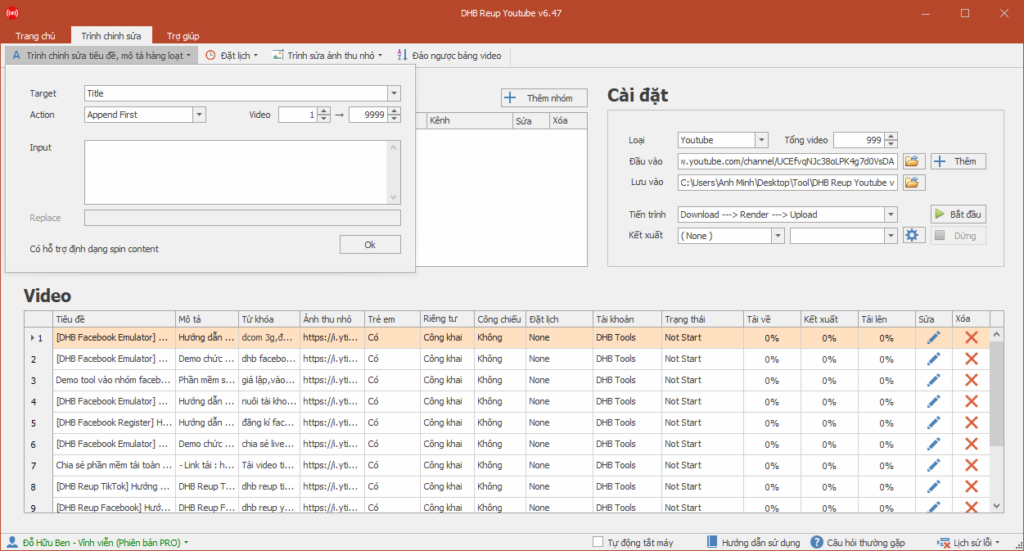
To bulk edit titles, descriptions, and tags, go to the Editor tab and select Text Editor. The Target field is set to title, which means you are editing titles. The Action field shows which type of action you are using
For example, I select title as the target. The Action is Append First. In Input, I will enter DHB Upload. In the video range, I select 1 -> 9999, which means the action will be applied from video 1 to video 9999. Then click OK
You can see that the titles of the videos in the video table now include the words DHB Upload. From here, you can use Append End to insert at the end. Replace replaces a word. Replace All replaces the entire title. Translate translates the title
Note: for the translation feature, if you use Google Translate, the word count will be limited, so I recommend using Yandex Transate. When using Yandex Translate, remember to enter your Yandex API key
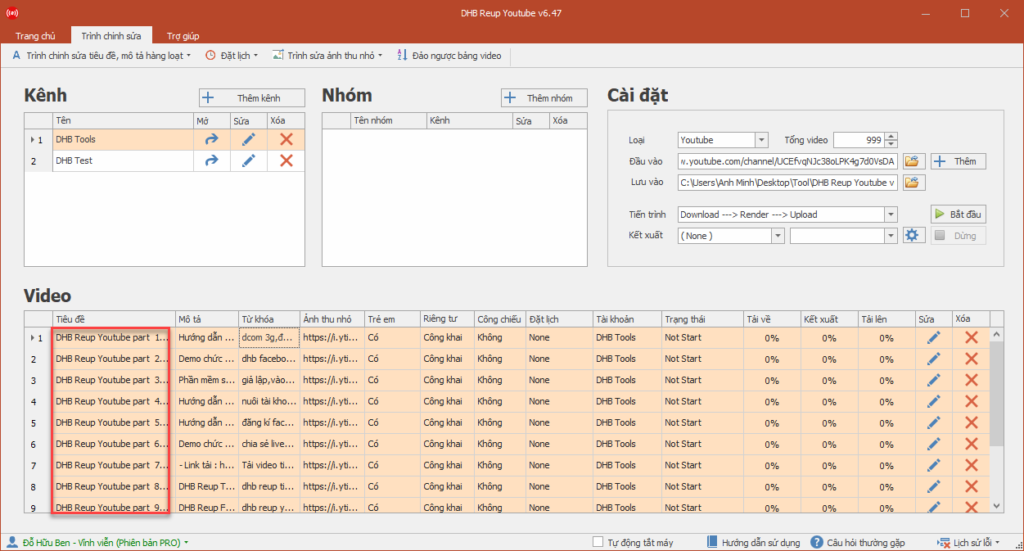
For the title, if you want to add a sequence number, in the input field you can type $(serial,1)$ to represent an increasing sequence number. The number 1 is the starting number. For example, in Target I select title, and in Action I select Replace All. In Input, I will enter DHB Upload Youtube part $(serial,1)$ then all videos in the tool will have titles as follows
Schedule multiple videos in bulk
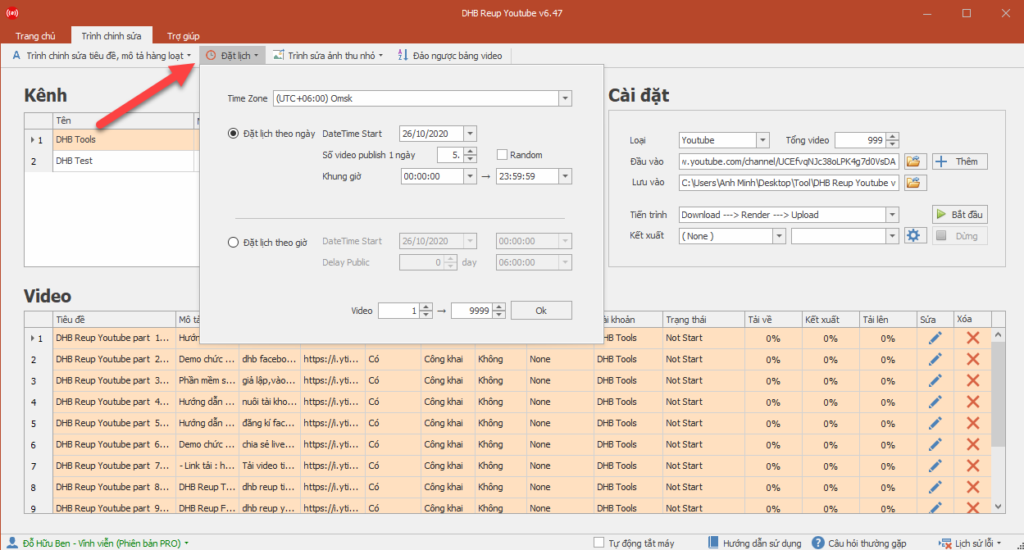
Similarly, to schedule in bulk, go to the Editor tab and select Schedule. Choose the time zone, then choose the scheduling type
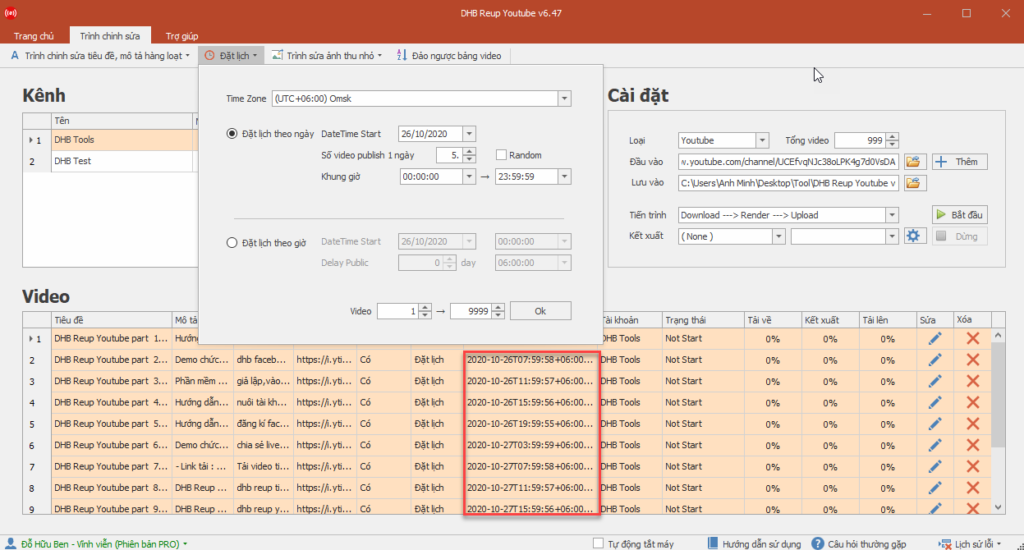
If you choose scheduling by day, you need to enter the number of videos to publish per day. Select the time range for publishing. The tool will automatically distribute the videos evenly within that time range. If you check Random, the tool will randomize the video publishing times within the time range you selected. For example, here I will choose scheduling by day with 5 videos published per day. The time frame is from 10 AM to 2 PM. The time zone is +7. You can see under the video table that the first video will be published at 10:40, the second video will be published at 11:20, and by the sixth video it will move to the next day and publish at 10:40
If you choose scheduling by hour, you need to enter the start time and delay time. For example, if I want to start on 5/2/2019 at 0 hours 0 minutes 0 seconds, and publish 1 video every 6 hours, I will set it up like this. For Datetime Start, I select February 5, 2019 at 0 hours 0 minutes 0 seconds. For Delay public, set 0 day 6 hours and click OK. You can see in the video table that the first video will be published at 00:00:00 on 5/2/2019, the second video will be published at 06:00:00 on 5/2/2019, and so on until the end of the video table
Add a logo to thumbnails
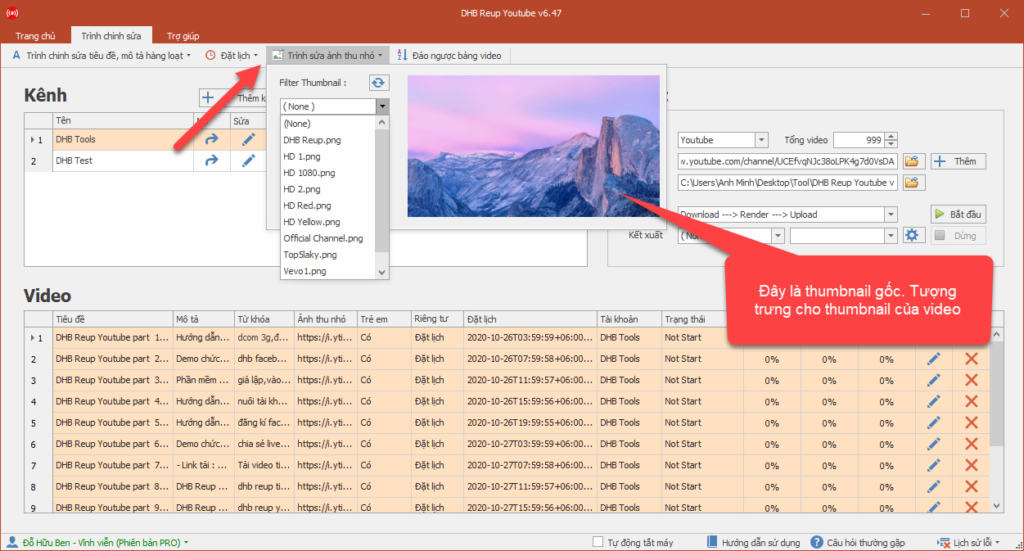
To add a logo to thumbnails, go to the Editor tab and open Thumbnail Editor. If you check upload thumbnail, the tool will automatically upload videos from youtube and facebook. In the Filter Thumbnail section, you can choose logo types to overlay on the thumbnail. To add a thumbnail filter to the tool, go to the folder Tool\Data\Data Render_Thumbnail then paste your thumbnail logo there. Note that the format should be PNG
Wishing you success!!!
If you have any questions, please contact us through our website and Fanpage
https://dhbtools.com/
http://m.me/dhbtools
https://www.facebook.com/dhbtools
Bình luận
Chưa có bình luận nào. Hãy là người đầu tiên!

Hướng dẫn khắc phục lỗi không tải được video YouTube trên DHB Tools
Trong quá trình sử dụng DHB Tools để thêm video vào dự án. Đây là lỗi khá phổ biến và không phải do phần mềm bị hỏng, mà thường liên quan đến trình duyệt và quyền truy cập hệ thống. Cài đặt Mozilla F
Read more →
Hướng dẫn lấy cookie Youtube sử dụng cho DHB Upload Youtube
Cách lấy Cookie Youtube cũng giống như các bước ở các nền tảng trước mình hướng dẫn trước đó. Các bạn thưc hiện theo các bước sau nhé nếu ai đã tiếp cận và sử dụng cookie facebook, ixigua từ hướng dẫ
Read more →
Hướng dẫn chuyển Profile Upload Youtube V8
Hướng dẫn chuyển Profile Firefox đã đăng nhập sang nhiều khác nhau mà không cần đăng nhập lại (hoạt động tương tự Firefox Protable) để sử dụng phần mềm Upload Youtube V8. Ở các phiên bản trước đối v
Read more →
Hướng dẫn thêm Profile Upload Youtube
Hướng dẫn thêm Profile sử dụng cho phần mềm Upload Youtube V8 để upload Ở các phiên bản trước các bạn cần làm các bước như tạo Profile với hộp thoại run và đăng nhập trước v.v... ở phiên bản này thì
Read more →