
How to Top Up and Get API Keys for AI Models
Artificial intelligence is rapidly advancing across many different platforms. OpenAI, Gemini, and DeepSeek are three leading AI platforms that provide powerful APIs, allowing developers to integrate large language models into their applications. Below is a brief guide on how to top up and get API keys from these three platforms.
1. OpenAI
Log in/Register
- Go to: https://chat.openai.com
- Log in: Select "Login" in the top-right corner
- Create a new account: Select "Sign Up" if you do not have an account yet
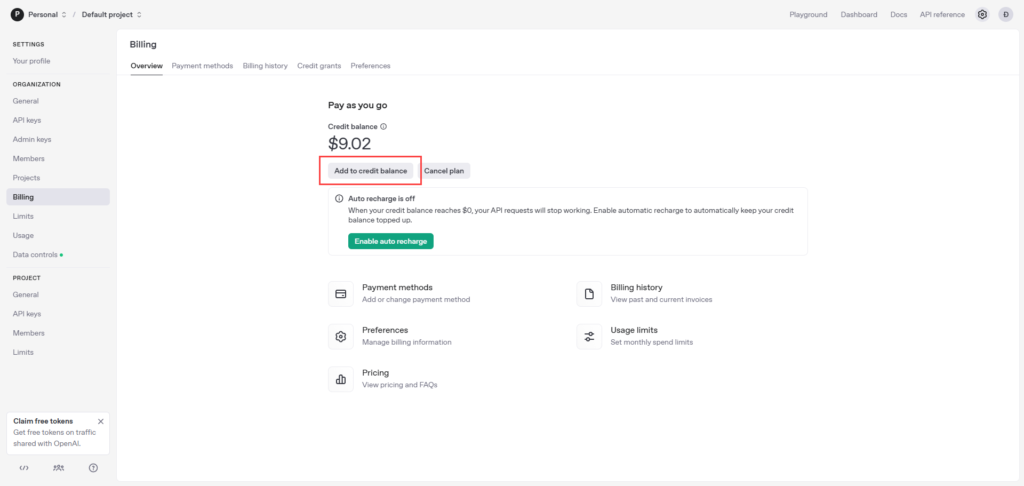
Top up
- Log in to your OpenAI account
- Select "Settings", then choose "Billing"
- Click "Add to Credit Balance" (minimum $5)
- Enter your credit card details or pay via PayPal
- Confirm the payment
Get the API Key
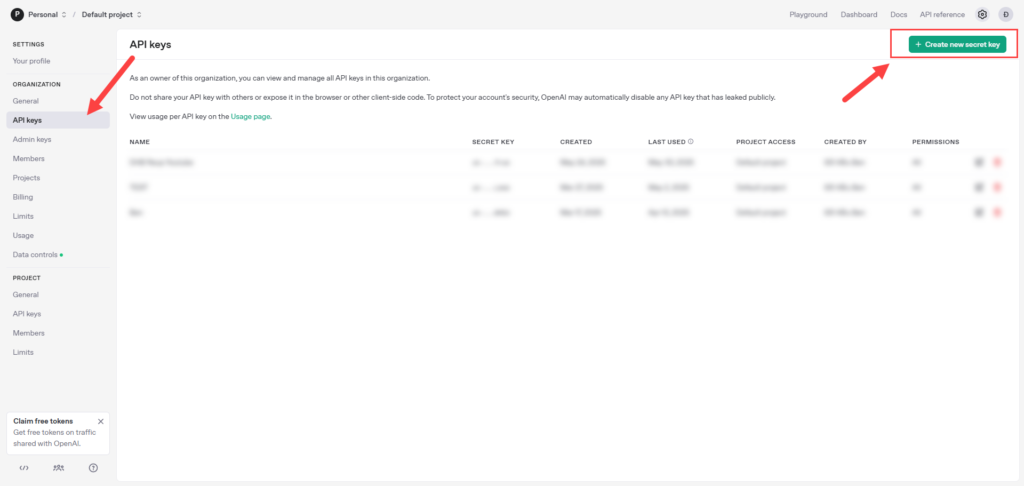
- After logging in through the interface at https://platform.openai.com/settings/organization/api-keys
- Select "Create new secret key"
- Name the API key (for example: "demo API key")
- Click "Generate" to create the API key
- Copy and store the API key in a safe place (you will not be able to view this key again after closing the page)
2. Gemini
Log in/Register
- Go to: https://gemini.google.com/app?hl=vi
- Log in: Select "Log in" with your Google account
- Verification: Complete 2-step verification if required
Get the API Key
- Go to Google AI Studio at https://aistudio.google.com/apikey
- Log in with your Google account
- Click "Get API Key" and accept the terms of service
- Select "Create API Key"
- If you already have a previous project, select a project to manage the new API key
- Copy the API key and store it securely
Top up
- After getting the API key, go to your project
- Click the "Google Cloud" icon in the left corner of the browser
- Select "Billing" → "Link a billing account"
- Select "Create billing account" → choose your country → "Agree & Continue"
- Enter your payment information and complete the setup
3. DeepSeek
Log in/Register
- Go to: https://www.deepseek.com or https://chat.deepseek.com
- Create a new account:
- Select "Sign Up" on the homepage
- Enter your email, password, and confirm your password
- Receive the verification code by email and enter it
- Or log in with your Google account
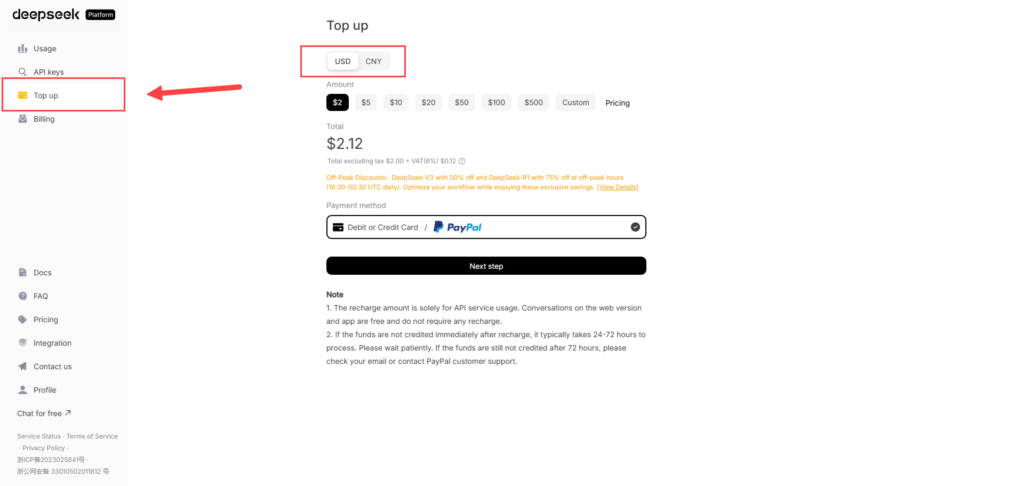
Top up
- Log in to your DeepSeek account
- Click "API Platform" on the right sidebar
- Select "Top up" from the left menu
- Choose the amount you want to add ($2, $5, or a custom amount)
- Select a payment method (credit/debit card or PayPal
- Complete the payment
Get the API Key
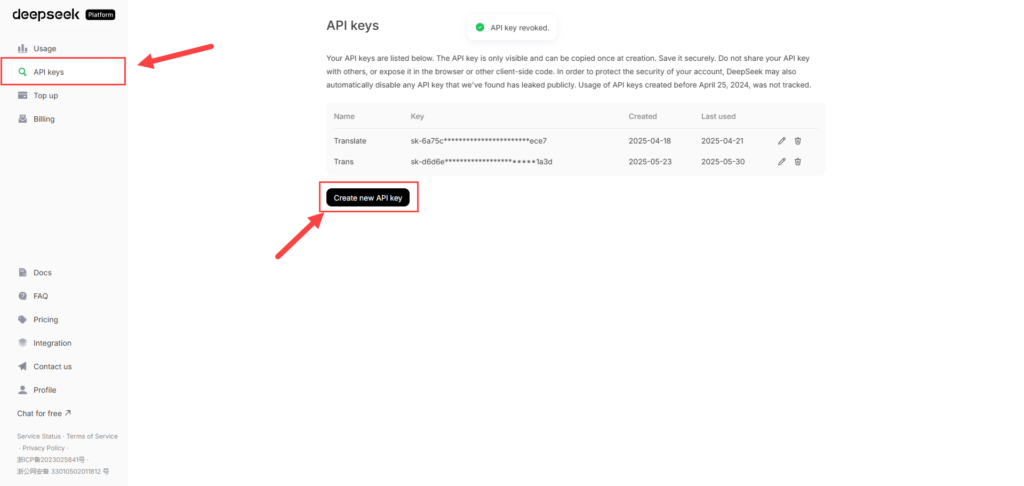
- Log in to your DeepSeek account
- Select the "API Keys" section on the left sidebar
- Click it to create a new API key
- Copy and store the API key in a safe place
Pricing information
OpenAI
- Prices vary depending on the model used
- o3-mini model: $0.55/million input tokens, $4.4/million output tokens
DeepSeek
- DeepSeek-Chat (V3): $0.27/million input tokens, $1.1/million output tokens
- DeepSeek-Reasoner (R1): $0.55/million input tokens, $2.19/million output tokens
- 50-75% discount during 16:30-00:30 UTC every day
Gemini
- Free and paid versions are available
- Business plans start from $18/user/month (annual billing) or $20/month (monthly billing)
For any questions, please contact us via our website and fanpage
https://dhbtools.com/
http://m.me/dhbtools
https://www.facebook.com/dhbtools
Bình luận
Chưa có bình luận nào. Hãy là người đầu tiên!

Hướng dẫn tạo người dùng hệ thống quản lý Page trên BM sử dụng DHB Upload Facebook
Hiện tại Facebook đã hỗ trợ tải lên với tài khoản liên kết với Bussiness với tính năng "Người dùng hệ thống". Ưu điểm chính của tính năng này các bạn sẽ không cần đăng nhập tài khoản cầm Page và cũng không cần cấp quyền cho nhiều tài khoản cầm Page như trước nữa. Dưới đây sẽ là hướng dẫn chỉ tiết sử dụng tính năng này ở DHB Upload Facebook
Read more →
Hướng dẫn sử dụng DHB Comment Facebook
Nếu bạn đang tìm một công cụ hỗ trợ Affiliate số lượng lớn, quản lý nhiều Page hoặc triển khai nội dung quảng cáo trên Facebook, DHB Comment Facebook là một lựa chọn phù hợp để tối ưu quy trình và giảm bớt các thao tác thủ công lặp lại.
Read more →
Hướng dẫn tự soạn bình luận với AI trên DHB Comment Facebook
Tính năng Soạn bình luận với AI giúp tự động tạo nội dung bình luận dựa trên từng bài viết, thay vì phải viết thủ công từng comment. Bạn có thể tùy chỉnh độ dài, phong cách nội dung và xem lại kết quả trước khi gán vào bài viết.
Read more →
Hướng Dẫn Lấy API Google Drive v3
Google Drive API v3 giúp bạn kết nối ứng dụng, website hoặc phần mềm với Google Drive để lấy thông tin file, kiểm tra file, đọc danh sách file hoặc xử lý dữ liệu từ Drive.
Read more →